What is Epson Photo+?
Overview
Printing Photos
Laying Out and Printing Photos and Text
Printing a Photo Index
Printing Disc Labels
Printing ID Cards
Printing ID Cards From the Blank Pages
Printing ID Cards With Photos
Printing ID Photos
Printing by Drag & Drop
Printing a Computer Screen
Arranging Photos
Rearranging Photos
Changing Photos in the Frame
Rotating Photos and Items
Adding an Image to the Frame
Adding Stamps
Adding a QR Code
Entering Text
Setting a Background
Adding Shapes
Changing the Paper Orientation
Adding Margins to Photos
Editing Photos
Changing the Format of the Date Photos were Shot
Troubleshooting
Print Results are Unusual
Cannot Import Photos
Photos are Slow to Display (Load)
The Shooting Date and Time are Wrong
The Paper Size I Want to Use is Not Displayed
Cannot Change the Paper Orientation
Template Update Screen is Not Displayed
Appendix
Menu List
Settings
Trademarks
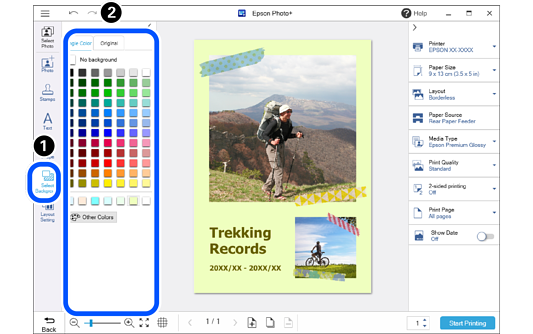
Click Select Background.
Click the color or pattern you want to set as the background.
You can also set your own images as the background.
Click the Original tab, and then click Open to select an image.
 Click
Click  Click the color or pattern you want to set as the background.