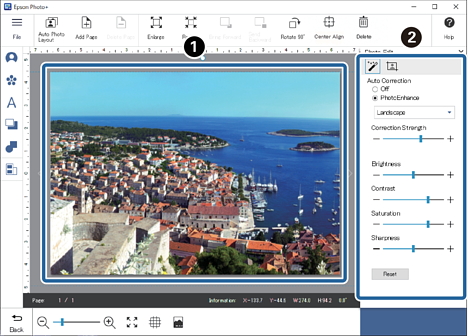
You can adjust the brightness, contrast, and so on of the photos.
Click a photo.
Adjust the brightness, contrast, and so on.
Items you can Adjust Using
Note:
The tab is only displayed when you select a photo in JPEG or TIFF format.
Item
Explanation
Auto Correction
Off
Photos are not corrected.
PhotoEnhance
This feature allows you to automatically print high quality images using Epson's own image analysis/processing technology.
Select the correction mode according to the subject of the photo.
(PhotoEnhance correction mode)
Standard
Performs optimum finishing according to the photo.
People
Ideal for shooting portrait photos.
Landscape
Ideal for shooting blue skies and green landscapes.
Night Scene
Ideal for shooting night-time photos.
B&W
Adjusts photos to black and white (grayscale).
Sepia
Adjusts photos to white and dark brown (sepia).
Backlight
Adjusts darker subjects so that they are brighter.
Correction Strength
Adjusts the effect of the selected correction mode.
Brightness
Adjusts the brightness of the photo.
Contrast
Adjusts the contrast ratio of the photo.
Saturation
Adjusts the saturation (color vividness) of the photo.
Sharpness
Emphasizes and sharpens the outline of the photo.
Reset
Returns the adjusted value to its initial value.
Items you can Adjust Using
Item
Explanation
Transparency
Adjusts the transparency of the photo.
Blur
Adjusts the blurriness of the photo.
Reset
Returns the adjusted value to its initial value.
Crop
This is only displayed when you select a photo that was added using . You can select the cropping pattern for the photo and adjust the cropping range and position.


 Home
Home
 Click a photo.
 Adjust the brightness, contrast, and so on.


 . You can select the cropping pattern for the photo and adjust the cropping range and position.